Uber Freight’s Tracking Policy: To best partner with Uber Freight, we expect carriers to provide timely tracking status updates throughout the lifecycle of each load via one or more automated data sources.
Required status updates include:
- Dispatched 3+ hours before Pickup
- Arrived at Pickup
- Departed Pickup
- Arrived at Dropoff
- Delivered
For more information on Uber Freight’s Tracking Policy, please reference these quick training videos for more information on what the policy is, automated options available, and how to onboard
There are three ways in which you can integrate with Uber Freight to ensure efficient tracking.
1. App Overview
Uber Freight recommends to always track through the app in addition to any automated options listed below. Click here to download the app on your mobile device.
There are 3 ways to provide location updates through the Uber Freight app:
- Keep the app open throughout the lifecycle of the load to provide automatic location updates
- When prompted, tap the in-app confirmations that you have moved to the next stage of the load
- Submit a live status update through in-app support
App Requirements
- Download the app, sign in, and set Location Services to “Always Allow”
- Keep the app turned on throughout the load so that it can register location updates
- Provide the following 5 status updates in a timely manner: Dispatched 3+ hours before Pickup, Arrived at Pickup, Departed Pickup, Arrived at Dropoff, Delivered
2. ELD Overview
When a carrier integrates the ELDs in its trucks with Uber Freight, the ELD automatically provides load location updates
ELD Requirements
- Have a KeepTruckin, Samsara or Transflo ELD installed in the truck hauling the load
- Provide an accurate truck and trailer number on every load
To integrate your carrier’s ELDs with Uber Freight, your carrier must sign an updated carrier agreement. Please email ufcarrierintegrations@uber.com to receive and sign the latest carrier agreement, which includes a telematics data sharing consent
Check out our deeply discounted programs with KeepTruckin, Transflo and Samsara
3. Third-party Data Aggregator Overview
Third-party aggregator automatically gives load location updates
Options: project44
Third-party Data Aggregator Requirements
- Onboard to project44 here
- Provide an accurate truck and trailer number on every load
Note: To ensure the most real-time updates, Uber Freight prefers the automated tracking systems listed above. If your carrier has an EDI (TMS) integration with Uber Freight, this can also be considered a source of automated tracking for larger fleets.
If your carrier is interested in exploring an EDI connection with Uber Freight, please reach out to freight-solutions@uber.com to discuss the feasibility of integration. Integrations typically take about 1-3 weeks. Tracking statuses must be maintained in TMS for automatic updates to be successful.
Frequently Asked Questions
What are the benefits of using an automated tracking source and sharing my data?
Using an automated tracking source should result in fewer tracking calls. It will also improve your tracking automation score on the carrier scorecard. In the future, other benefits may be added.
How does using an automated tracking method impact my tracking automation score on the carrier scorecard?
The tracking automation score is based on status updates received from an automated source (Uber Freight App, connected ELD, or Project44) against all required status updates from your last 40 loads. The required status updates are:
- Dispatched 3+ hours before Pickup
- Arrived at Pickup
- Departed Pickup
- Arrived at Dropoff
- Delivered
Using one or more of the automated tracking methods above and providing the necessary information on each load will directly improve your tracking automation score.
What are the best practices for using the Uber Freight app?
- Only log in to one device at a time
- Do not kill or swipe away from the Uber Freight app
- Dispatch yourself in-app by swiping the "Heading to Pickup" notification that appears 3 hours before the designated pickup time or dispatch yourself through in-app support
- Re-open the app at critical points in the load (such as dispatch, pickup, dropoff, after a break) and engage with all in-app notifications
- Charge your phone continuously during the trip (avoid low battery mode) and keep the Uber Freight app open in the foreground with the screen on where possible.
How can I limit tracking calls?
We recommend setting up with one or more automatic tracking options—the Uber Freight app, an ELD, an aggregator, or an EDI. While there may still be instances where we will need to call, having location updates can help reduce the frequency of calls.
Will I still get calls when I'm integrated with an automated tracking source?
When automated tracking is working properly, we do not expect to call drivers or dispatchers to obtain tracking updates. However, if real-time location data is not transmitting properly or if there are non-tracking reasons that we need to contact you regarding a load, Uber Freight may still call to confirm necessary load details or inquire about other matters.
Can I use more than one of the tracking methods?
Absolutely. Using multiple methods increases the likelihood of real-time location updates being received.
What is Uber Freight’s preferred method of location sharing?
Our preference is for you to share your location through the Uber Freight app and your ELD. These methods are updated in real time and allow you to communicate with us when needed throughout the load (e.g., the app allows you to confirm dispatch prior to pickup).
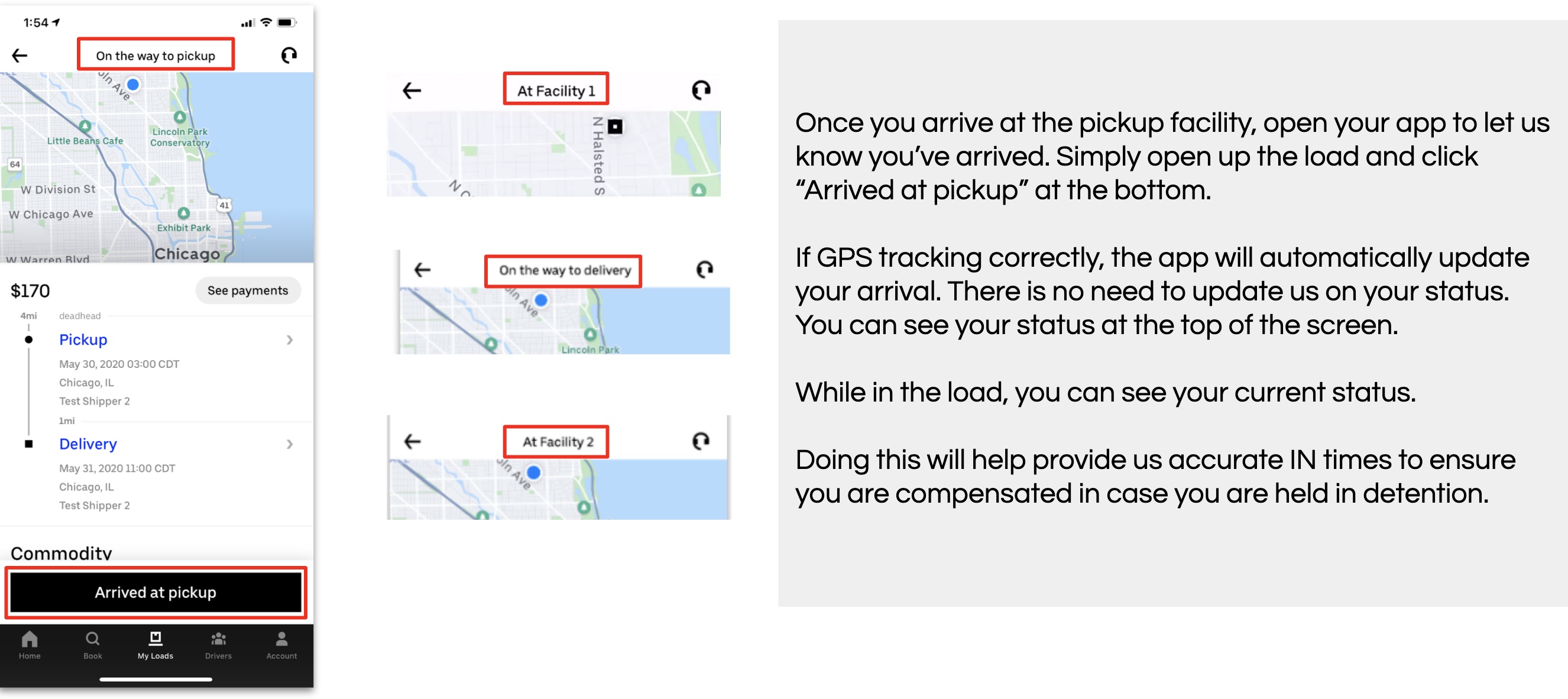
We recommend using our app along with other automated options as you will always have visibility to your current status. If your status does not appear as it should, submit a ‘Live Status Update’ in the app by selecting the headset in the top right corner of the screen.
If my carrier has an EDI (TMS) integration with Uber Freight, will status updates from this source be considered automated for my carrier’s tracking automation score?
Yes, if your carrier has an EDI integration in place, this is viewed as an automated option. Using additional automated tracking options (the Uber Freight App, connect ELD, third-party location aggregator) on route is encouraged for real-time tracking.
If your carrier is interested in exploring an EDI connection with Uber Freight, please reach out to freight-solutions@uber.com to discuss the feasibility of integration. Integrations typically take about 1-3 weeks. Tracking statuses must be maintained in TMS for automatic
I don't use a KeepTruckin ELD, but I’m interested in learning more about the Uber Freight discount.
No matter your fleet size, you may be eligible for our discounted KeepTruckin ELD program. Find out how you can qualify for 15% off ELD hardware and subscription.
I don't use a Samsara ELD, but I’m interested in learning more about the Uber Freight discount.
If your carrier has 6 trucks or more, you may be eligible for our discounted Samsara ELD program which provides discounts up to $25,000 per carrier.
I don't use a Transflo ELD, but I’m interested in learning more about the Uber Freight discount.
If your carrier has 6 trucks or fewer, you may be eligible for our Free Transflo ELD program. If your carrier is not eligible, you can integrate through one of the other tracking options.
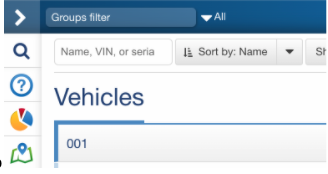
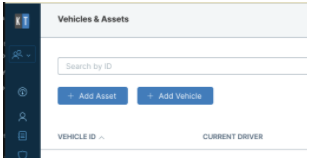
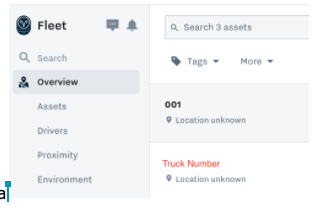
In order to ensure we’re getting updates from Samsara, we need the truck number EXACTLY as it appears within your ELD provider. If it does not match with your truck number, please edit the Asset name within Samara/Transflo/KeepTruckin’. Pro tip: Keep the truck numbers simple and something that will be easy to remember and provide as needed.
Do I need to provide a truck and trailer number?
In order for Uber Freight to match your device to a load and successfully receive location updates, we need to verify the truck and trailer number. This is required across all of our ELD and aggregator options.
How can I provide truck and trailer information?
Currently, this can only be done by giving this information verbally to a Uber Freight rep at booking. In the future, you will be able to provide this information through the Uber Freight app or web portal.
When does Uber Freight need to receive truck and trailer information?
Truck and trailer information should be provided to Uber Freight by the time of dispatch (at least 3 hours before pick up). If possible, please provide truck and trailer information at the time each load is booked.
What data does Uber Freight collect?
Uber Freight collects GPS location data.
Why does Uber Freight collect this data?
Uber Freight uses the GPS location data to improve the services provided to carriers and shippers, including:
- Reducing or eliminating location-request calls to dispatchers and/or drivers on loads in progress
- Tracking loads booked via the Uber Freight platform
These initiatives make carriers more efficient while transporting loads booked via Uber Freight. In the future, this data may be used for automatic processing of detention and other carrier accessorials.
Does Uber Freight share this data with anyone?
Uber Freight may share this location data with the shipper and/or receiver of a load to keep them informed of the location of their freight while in transit. In addition, Uber Freight may share this data with other third parties who require, request, or use such data in connection with transportation, logistics, delivery, and/or other related services arranged or performed by Uber Freight. For more information, please see the Uber Freight Privacy Notice.
How long does Uber Freight store my data?
Uber Freight stores location data that can be tied to a specific carrier for three years. After three years, Uber Freight destroys the location data.
What happens if a carrier chooses not to share automatic tracking data?
The dispatcher and/or driver will receive on average 5 tracking calls per load.
Will Uber Freight be required to share carrier data if asked in a DOT audit?
Uber Freight will only share this location data with the DOT if we believe it is required by applicable law, legal process or governmental request.
Does Uber Freight reimburse for data usage, such as a phone plan?
No, Uber Freight will not reimburse for data usage.
You’re tracking me through the Uber Freight app, why do you need my ELD data as well?
The app only tracks location if the app is open and on through the entire lifecycle of the load. ELD devices allow carriers to set up automatic tracking without worrying about app usage or cell phone issues. Because ELDs are on during trips, Uber Freight can acquire location throughout the load, requiring less work from the carrier and the driver. However, to receive real-time ELD updates, it is critical that the carrier provides truck and trailer information on every load.
We have our own way to track our drivers, so why do you need to track them constantly?
Uber Freight’s goal is to help our shippers and carriers become more efficient. When ELD data is shared, Uber Freight is able to reduce tracking calls and improve efficiency and safety for carriers.
For any other tracking or location data-sharing related questions, please reach out to ufcarrierintegrations@uber.com.